
For most of my career in data, I rarely used Git.
The reason was practical. Software teams clearly needed version control. Several developers could be changing the same application at once. Releases had to be reviewed. Production code needed a path back when something failed.
My work operated differently.
I was usually working alone inside a tool that already contained most of the experience. Build a Power BI report. Change a pipeline in a visual designer. Adjust a notebook. Publish the result. If something was wrong, open the tool again and fix it.
The workflow was closer to editing a document than maintaining a software system. I knew what had changed because I was the person who changed it. The tool had an Undo button. The output was easy enough to republish. Git looked like a lot of additional process for a problem I did not encounter often enough.
Even when the work involved code, the economics were hard to justify. I would finish a SQL query or notebook, then stop doing the actual work so I could administer the history of the work. Which files belong in this commit? Did I accidentally change something unrelated? What should the message say? Do I commit now or after the next change? Then push, pull, fetch, merge, or whatever the right operation happened to be.
If you do not come from a developer background, much of that happens behind a command line that makes every mistake feel more consequential than it probably is.
When I was trying to move quickly, Git felt like organizational work I was doing for a future problem. Most of the time, fixing the problem directly seemed easier than maintaining a pristine record in case I needed to fix it later.
That calculation has changed completely.
Agents made Git necessary at the same moment they made it almost effortless.
Git Was Not Built Into the Work
Many data workflows made Git difficult to justify for practical reasons.
A lot of data work lived inside applications that did not expose their state as useful, reviewable files. A report, semantic model, or low-code pipeline might exist as an opaque artifact or as configuration stored inside a service. Git could not explain which relationship I changed in a model or which box I reconnected in a visual pipeline. At best, it could store a large file and tell me that the file was different.
Inside the application, that was manageable. The tool understood its own state. It could offer Undo, save the artifact, publish the result, and preserve enough context for one person to continue working.
The boundary became fragile when the workflow extended outside the tool. A report could depend on SQL, Python, a cloud pipeline, configuration, an API, and eventually an application wrapped around the result. Undo inside one interface could not return that whole workflow to a known state.
Git was the obvious answer, but using it still required a person to translate the work into repository mechanics. The person had to understand what changed, organize those changes into coherent checkpoints, describe them, synchronize them, and resolve the state when someone else had moved the repository forward.
For a solo data practitioner, that could be a poor trade. Git offered future traceability in exchange for immediate friction. When the artifact was small, the work was exploratory, or the tool itself handled publishing, the value often arrived too late to justify the ceremony.
That is why telling data teams to behave more like software engineers never fully addressed the problem. We appreciated clean history. Creating that history still felt like a second job attached to the first one.
Agents Changed Both Sides of the Equation
Agentic coding increases the need for version control.
I can ask an agent to improve one part of an application and watch it modify the data logic, backend, interface, tests, and configuration in the same session. The work happens faster than I could type it and often crosses boundaries I would have treated as separate projects before.
Even when it is just me and one agent, I am no longer the only author.
I cannot rely on memory to reconstruct every edit because I did not make every edit with my own hands. I need a reliable way to see what changed, understand the scope, and preserve the moments I trust.
At the same time, the agent removes most of the Git overhead that kept me from building that habit.
An agentic coding environment such as Codex or Claude Code already knows which objective we have been working on. It knows which files it changed to complete that objective. It can inspect the repository, separate its work from unrelated changes, write a useful commit message, and handle the mechanics of synchronizing with the remote repository.
I do not have to remember the command. I can describe the outcome: “Save the work we just finished, and only that.”
That does not mean I should let the agent commit blindly. It means the agent can propose the scope and operate the machinery while I stay focused on the decision that matters: whether this version of the work is coherent enough to preserve.
The agent handles the procedure.
The manager chooses the checkpoint.
The Conversation Creates the Checkpoint
My commit strategy is not especially formal. It follows the rhythm of the work.
I ask the agent to do something. It works through the files, runs the relevant checks, and returns with the result. I review what it produced. If that piece makes sense, there is a natural pause before we move to the next request.
That is usually when I say, “Commit this.”
The conversation has already defined the boundary. The prompt described the objective. The diff records how the agent implemented it. The commit preserves the result I accepted.
A commit becomes the period at the end of a completed piece of work.
The closest analogy for me is Google Docs version history for a workflow that no longer fits inside one document. Google Docs records the history almost invisibly. Git asks for more intentional checkpoints. Agents close much of that usability gap: they handle the recordkeeping while I decide which moments actually represent a coherent version.
We followed that exact pattern while revising another post on this site. We worked through the argument in several passes. Once the new version felt complete, I asked the agent to commit it. The repository also contained unrelated image artifacts and resume work. The agent inspected the state, staged only the approved post, verified the diff, wrote the commit message, and left everything else alone.
I did not stop to reconstruct which file belonged to the conversation. The agent already had that context.
As the work grows, the same conversation can introduce more structure. The agent can recognize that a new direction belongs on a branch, that the next request should become a separate commit, or that a collection of checkpoints is ready for a pull request. Git becomes conversational. I do not need to operate every step manually to benefit from the structure those steps create.
This also explains why the checkpoint still belongs to the person supervising the work. The agent may know which files it changed. It does not automatically know whether the result expresses the right business rule, preserves the intended experience, or is ready to become the new shared state.
The mechanics are delegated. The acceptance decision remains mine.
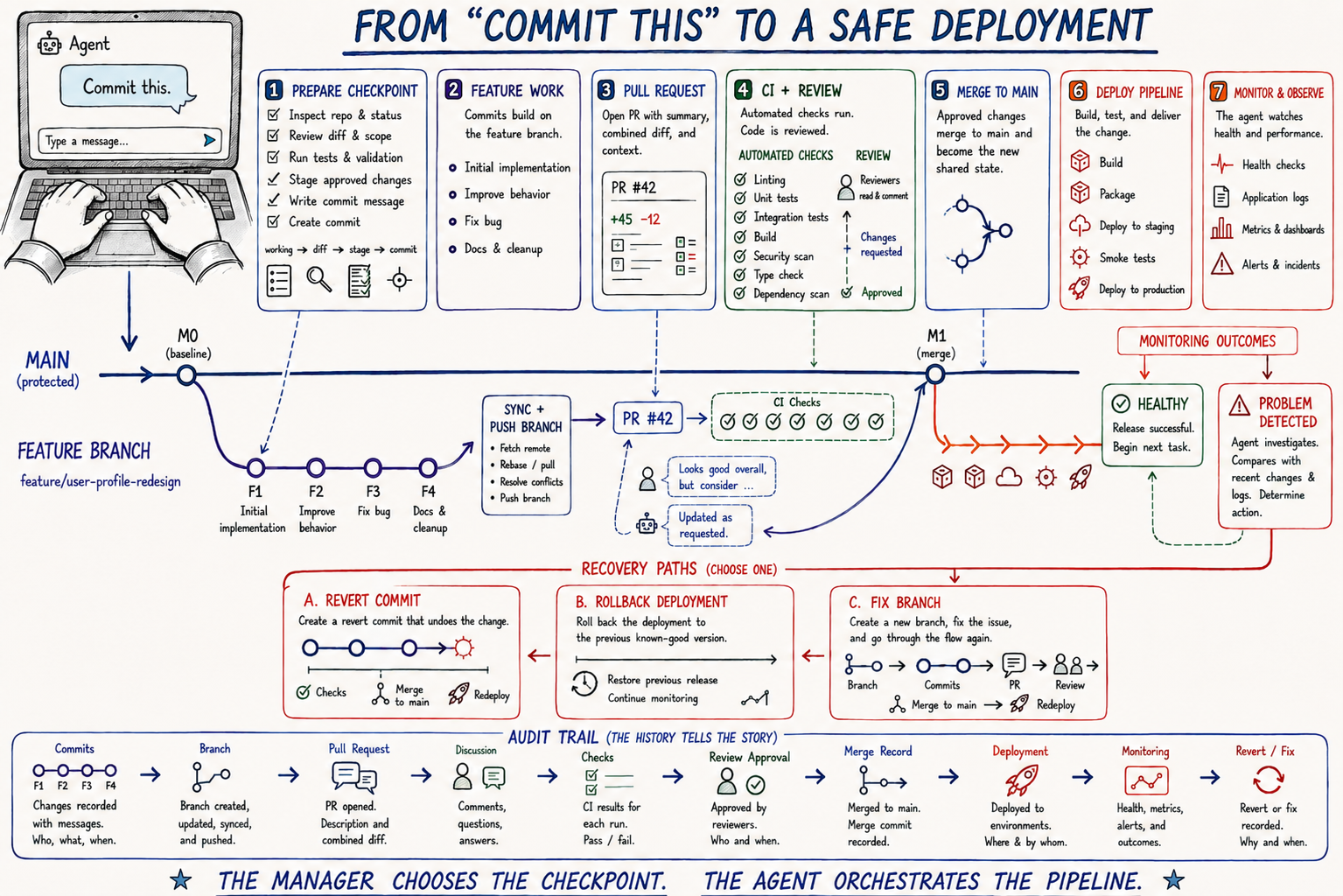
You are not meant to read all of it. That was the job. Now it is two words.
Git Gives the Agent a Memory Longer Than the Conversation
The value of those checkpoints becomes clearer as the project keeps moving.
In Private Journal, I used agents to decompose a large entry editor into smaller, more focused parts. Background work, metadata capture, media handling, navigation, and other responsibilities moved through a series of commits. The code became more modular, and each completed slice created another checkpoint.
Then a fresh review found behavior that had slipped.
The caret did not reliably remain visible while someone typed a long entry. Mood and tag suggestions, along with location, weather, and related metadata capture, were not responding the way they had before the editor work. The application still built. Much of the refactor was sound. But the user could feel that something had changed.
Without history, the problem would have been “the editor is wrong now.” The next agent would have to inspect the current system and infer which behavior was intentional, which behavior was new, and where to begin.
Git created a narrower question: what changed during the recent editor work?
The sequence showed the extraction of the background-work and metadata-capture sessions, followed by focused commits to keep the caret visible and restore responsive metadata suggestions. The repair did not require treating the entire application as suspect. The recent history established a boundary around the new uncertainty.
That is how I increasingly use agents for review. I can start a fresh session and ask it to inspect the work from the last week, compare recent changes with an earlier checkpoint, or look for unintended consequences introduced across a particular series of commits.
Recent change is where new risk entered the system, so it gives the reviewer a sensible place to begin. That focus does not declare the older code correct or the newer code wrong. It simply narrows the first pass to the part of the system whose behavior has changed.
It also preserves intent when later work moves the system backward. A feature can be improved in one commit and quietly weakened several changes later when an agent adds something nearby without knowing why the original behavior mattered. The earlier implementation is not trapped in my memory or saved as a code sample in a random document. It remains available as evidence:
It worked here.
What changed after this?
Git gives the agent a memory longer than the conversation.
Git does not prove that the earlier version was correct. Tests, logs, rendered output, data validation, and human judgment still have to establish that. What Git provides is legibility. It lets the next review see how the system evolved instead of treating the current state as if it appeared all at once.
The History Can Move Forward Too
Repository history is useful for more than restoring old behavior.
In Vicente’s Arcade, one commit fixed the Word Speller game’s landscape startup layout. Soon afterward, Shape Puzzle developed a related layout shift. The fix explicitly reused the Word Speller pattern rather than solving the same class of problem from scratch.
Later, Word Speller needed more protection against rebuilding before the game scene had a usable size. The next commit carried that hardening into Color Sorter and Shape Puzzle.
The repository had become a library of decisions. It did not just contain the finished code. The commits preserved which problem had been solved, why the solution worked, and where the same reasoning might apply again.
That matters for agents because their conversational memory is temporary. A new session may not know the history of every layout decision in an application. Git gives it a durable trail through the work. A well-scoped commit and a useful message can reintroduce context that would otherwise have disappeared with the conversation that produced it.
The repository remembers the solved problem, and the next agent can carry the solution forward.
The Commit Log Becomes a Work Ledger
I initially thought of Git history as insurance: something I would need only if I had to roll back a bad change.
I use it much more often as a record of the work itself.
When I want to understand what changed last week, I do not have to reconstruct it from chat transcripts, screenshots, or memory. The commits already organize the work into completed units. An agent can review them, group them by outcome, and explain how the project progressed.
That is useful in a remote environment where much of the effort behind a finished application is invisible. It is useful when evaluating AI spend because the history shows what the agent-assisted workflow actually produced. It is useful during an annual review, when remembering a year of small improvements is nearly impossible. It is useful when deciding whether a project has earned continued investment.
The value comes from connecting the history to outcomes. Ten cleanup commits may matter less than one change that resolves a critical business problem, which makes raw commit count a poor productivity metric. Without the history, however, much of the evidence behind those outcomes has to be recreated after the fact.
The same record can contribute to an audit trail.
UI-driven work often leaves behind screenshots and institutional memory. Someone remembers which setting changed, which pipeline box was reconnected, or which report was republished. Six months later, it can be difficult to show exactly what changed or reproduce the path that created the current result.
When the work is represented as files and preserved in Git, the organization can point to a specific change. The diff shows what was modified. The message explains the objective. The author and timestamp establish provenance. A pull-request approval, test result, deployment record, or operational log can add evidence that the change was reviewed and executed successfully.
Git creates a durable spine that the rest of the audit evidence can attach to. A complete record may also need to show that a calculation was validated, a reviewer understood and approved the change, and the deployed system behaved as expected.
The Manager’s Job Is to Stay Oriented
Git is not what turns me into the manager of agentic work.
The work does that on its own.
Once agents begin changing the system on my behalf, my responsibility moves away from typing every line and toward maintaining direction. What are we trying to accomplish? Which constraints matter? Does the evidence support the result? Is this change coherent? Is it safe? Is this the version we want to preserve and build on?
Git makes that role survivable.
It gives the team shared memory. It makes recent change reviewable. It marks the versions we trusted. It preserves solutions that future agents can reuse. It records the progression of the work and gives us a path back when later changes weaken something that previously worked.
I still do not need to become a command-line expert. I do not need to remember every operation or personally compose every commit message. The agent can handle those mechanics as part of the same workflow producing the code.
But I do need to establish the habit.
Finish a coherent piece of work. Review it. Commit it. Then move forward from something the project can remember.
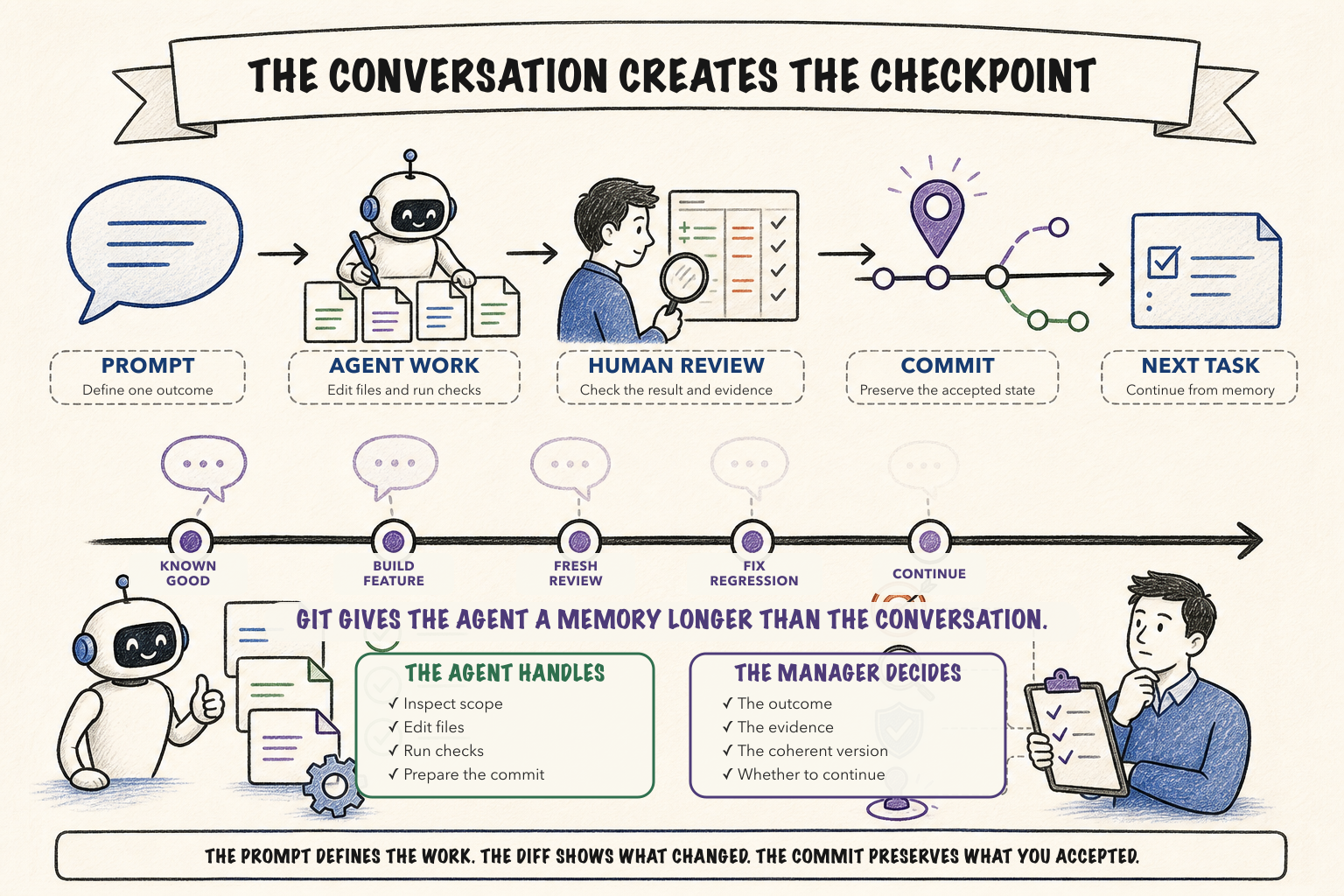
The prompt defines the work. The diff shows what changed. The commit preserves what you accepted.
Solo no longer means single-author when an agent is writing on my behalf.
The agent can operate Git.
The manager decides which moments are worth preserving.