
Every city has a planning office, and every planning office has a map. It shows every street, every bus route and every neighborhood, and it took months to get right. Everyone plans from the same copy, and the older editions in the drawer show how the city grew.
One morning someone calls and asks whether Main Street is open right now. The office has two options. Send someone down to Main Street to look. Or update the map every five minutes, around the clock, in case anyone else calls.
The second option sounds absurd. It's also how a lot of real-time reporting gets built.
Meanwhile, the traffic lights on Main Street don't wait for the map or a phone call. A light changes when a car pulls up, without anyone asking.
A business has the same three ways of knowing what's going on. The map is the data warehouse: one picture of the business, assembled from every system on a schedule, with the same streets and names for everyone who reads it. The street is the live systems themselves, where the business actually happens: the ERP, the CRM, the billing platform, the ticket queue. The traffic lights are the automated processes that react the moment something happens. For years, checking the street was slow and tedious, so teams leaned on the map for everything and kept it updating constantly so it could stand in for a trip outside. Agents have made checking the street cheap. That changes which questions need the map at all, and how often it's worth updating.
Why we kept updating the map
Checking the street used to mean five stops across town, one for every system.
Say a manager wanted to know where an important customer stood today. Someone had to open the ERP and copy the account number. Then search the billing system for open invoices, check the bank feed for payments, read the CRM for the latest notes and ask the account team whether anything had changed. Each step was simple. Together they took an afternoon, and they had to be repeated every time someone asked.
So when a manager said, "I need this in real time," data teams did the sensible thing and built a feed. Pipelines picked up changes from every system every few minutes, landed them in the warehouse, joined them together and refreshed the dashboard. The stitching happened once, automatically, and nobody had to make the rounds.
The trouble was the request itself. Ask what "real time" meant and the answer was usually some version of "when I open it, I want it to be current." That's a trip to the street, on the occasions someone needs one. What got built was a map kept current around the clock, for a dashboard opened twice a week. Modern feeds pick up only what changed, so the compute can be modest. The larger cost is everything around the feed: a pipeline for every source, a fix every time a source system renames a field, and someone responsible when it breaks at three in the morning.
The feed was the right answer to an expensive trip across town. Agents made the trip cheap.
The map tells you where to look
Picture a finance team on a Monday morning with an overdue-invoice report from the warehouse. One row is red: a $184,000 invoice, twelve days late, from a customer who has paid slowly before. The account team has a call with them that afternoon.
That's the map doing its job. Out of thousands of invoices, it has flagged the one worth a closer look.
Before agents, the closer look meant the trip across town, and it often didn't happen before the call. An agent makes the rounds in seconds. It checks the ERP and confirms the invoice is still open. It searches the bank feed and finds a payment for the exact amount, posted that morning under the customer's parent company instead of the legal entity on the invoice. The CRM has a note from Friday: the customer sent the remittance details.
The customer paid. The money is sitting unapplied because of a naming mismatch. The afternoon call changes from "why are you late?" to "thanks, we're fixing a matching issue on our side."
The map tells you where to look. The agent goes and checks the street.
The work took both. The warehouse found the exception among thousands of records, which no one would do by checking live systems invoice by invoice. The agent then pulled four records from four systems at the moment the question came up, and each lookup was the kind of work those systems are built for. An application database is designed to find one invoice, one payment or one account quickly. In the terms of Before You Point an Agent at Your Data, the agent took one kit off the shelf, which is what the kit warehouse does best. It still needs access to each system, and the guardrails from that post apply: read-only access, time limits and a copy of the database where one exists.
Give the agent only the map and the story ends differently. Connected only to the warehouse, it would have reported the invoice as twelve days late, accurately, and drafted a collections email for a customer who had already paid. The map was right about the past. The street had the morning's news.
What the map is for
If an agent can check the street whenever someone asks, the map's job gets clearer. It's the picture everyone shares, kept for three things the street can't provide.
Older editions. Many live systems keep only the current state. The ERP knows the invoice is open today, and when the status changes, the old value is overwritten. Some systems keep audit logs or version history, each in its own format and only where someone switched it on. To know that the invoice was open on the first of every month for a year, or when the customer's payment terms changed, that history has to be kept on purpose, starting before anyone needs it. The warehouse is the natural place to keep it, because it holds every system's history side by side, as editions of the same map.
The whole city at once. "How many invoices are more than thirty days late, across every customer?" is a counting question. Answered from the live systems, it means opening every kit in the warehouse: pulling every invoice from the application database while the application is trying to serve its users. Counting belongs in the bins, in a store built for analysis, where a question across millions of rows reads only the columns it needs.
One answer for everyone. Send ten people to check the street and they'll come back with ten slightly different numbers. One counts invoices by due date, another by issue date; one includes credit memos, another doesn't. That's fine for a single investigation. It isn't fine for the number that goes to the leadership meeting. Anything people report, compare or set targets against needs one definition, built once, and the map is where that definition lives.
Those are the map's jobs. Checking on one invoice this morning was never one of them.
Asked, scheduled or triggered
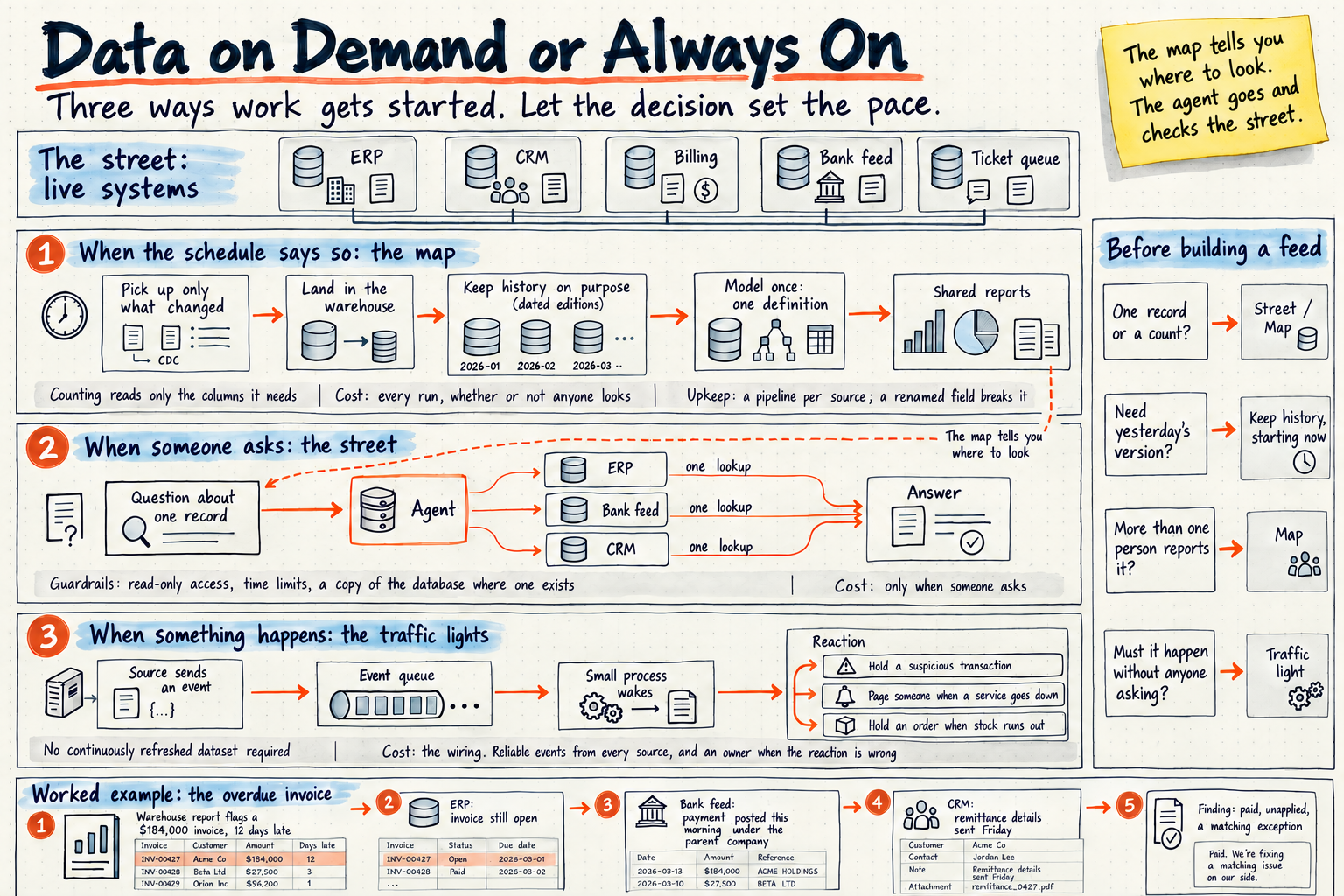
Every piece of data work starts one of three ways: someone asks, a schedule fires, or something happens. Choosing what should start the work is the real architectural decision, ahead of any tool or refresh rate, and each choice costs money differently.
When someone asks. The street. One record, one question, pulled from the live system at the moment it's needed. An agent checks the invoice, the payment and the note, and the work ends when the answer arrives. You pay only when someone asks. Agents made this cheap, and it now covers most of the "what's happening right now?" questions that used to justify a feed.
When the schedule says so. The map, updated nightly, hourly or as often as the people using it need. History, counting and shared definitions all live here. You pay on every run, whether or not anyone looks, so the schedule should match how often decisions actually get made. A report reviewed in a Monday meeting gains nothing from an update every five minutes.
When something happens. The traffic lights. A light changes when a car arrives, and nobody calls the planning office first. In data terms, a process reacts to an event as it happens: a suspicious card transaction gets held, a failed service pages someone, an order waits when stock runs out. That reaction can be a small process that wakes only when the event arrives, with no continuously refreshed dataset behind it. Reacting to an event and keeping an analytical dataset current are different jobs. The cost of a traffic light is in the wiring: every source has to send its events reliably, and someone has to own what happens when the reaction is wrong.
The trigger should follow the decision, and decisions change. Picture a one-time staffing analysis that needs six months of schedules joined to ticket volumes. Once the answer is in, the feed built for it can stop. If the same staffing decision comes up every Monday, a scheduled feed earns its keep. If staffing shifts automatically when the ticket queue spikes, that's a traffic light. Same data, three different triggers, chosen by how the answer gets used.
Let the decision set the pace
Before building a feed, I ask four questions:
- Is it one record or a count? One record can come from the street, when someone asks. A count belongs on the map.
- Do you need yesterday's version? If the answer depends on history, something has to keep that history on purpose, starting now.
- Will more than one person report this number? Shared numbers need one definition, and that means the map.
- Does something have to happen without anyone asking? That's a traffic light. If a person will open a screen and decide, it isn't one.
Most requests for real-time data answer those questions the same way: one record, today's version, one person, someone deciding. That's a trip to the street, and an agent can make it when the question comes up. The map stays for history, counting and the numbers everyone shares, updated as often as people actually use it. Traffic lights go where cars are actually waiting.
How fresh the data needs to be should follow the decision it serves, rather than the fastest speed the data can move. Check the street first. Keep the map for the picture everyone shares.